# Build Your App Theme Without a Display Server
A build container shouldn't need a pretend monitor to compile a stylesheet. Until now, parts of our CSS build path pulled in desktop machinery that made that a practical concern.
The CSS compiler now runs **100% headless**. You can compile the same theme over SSH, in a container or on a CI worker without starting a display server or virtual framebuffer. This is Monday's build-tools installment of the [weekly series](https://www.codenameone.com/blog/create-an-uber-clone-in-1-minute/).
## Keep the output, remove the window
Codename One CSS is compiled into a resource file. The app loads `theme.res`; it doesn't parse your stylesheet at runtime.
The compiler needs enough of the framework to construct fonts, convert some units and process images. Previously, reaching those APIs could bring desktop initialization along with them. The new implementation supplies the services theme construction needs without starting a GUI.

Images still need decoding and scaling. The implementation uses Java's image APIs with buffered images, which work in headless mode. A build without a monitor is still a build that processes visual assets.
The [headless implementation](https://github.com/codenameone/CodenameOne/blob/master/maven/css-compiler/src/main/java/com/codename1/designer/css/HeadlessCssCompilerImplementation.java) fixes the conversion values used during theme construction instead of taking them from the build machine's display. That removes another source of variation between a developer laptop and a worker.
## Use your existing CSS workflow
New Maven apps already enable CSS. An older project can enable it in `common/codenameone_settings.properties`:
```properties
codename1.cssTheme=true
```
The existing goal still compiles the theme:
```bash
mvn cn1:css
```
For a check that explicitly exercises headless operation, run the goal with the JVM's headless flag:
```bash
mvn -Djava.awt.headless=true cn1:css
```
Your normal application build invokes CSS compilation as needed too. The [CSS goal reference](https://www.codenameone.com/developer-guide/maven-appendix-goals/#_compile_css_css) and [CSS chapter](https://www.codenameone.com/developer-guide/css/) cover the project layout and output.
Stylesheets can be split into local files. Imports go before ordinary rules, and a URL inside an imported stylesheet remains relative to that file:
```css
@import "widgets/buttons.css";
WlPrimary {
background-color: #1f5eff;
color: #ffffff;
border-radius: 2.4mm;
}
```
`WlPrimary` is a component UIID, the name a Codename One component uses to select its style. It isn't a browser class selector. Missing imports and import cycles fail the build. Remote stylesheet imports are refused.
## What gets faster, and what to measure
Removing GUI startup and framebuffer setup removes work from the theme build. It also removes display configuration that an automated tool otherwise has to install and diagnose. That's a useful reduction even before comparing build times.
I don't have a representative end-to-end timing to attach to every project. A large build may spend most of its time compiling Java or downloading dependencies. Measure the CSS step and the complete build separately before attributing a change to this compiler.
A simulator still displays a GUI. UI tests still need their own execution environment. This change lets a theme compile without one; it doesn't make every graphical test headless.
## The risk is in the small details
Our CSS compiler already had fragile corners. Replacing its execution environment is a change I want users to benefit from, and also one I want them to check carefully.
A build can succeed while a shadow, font metric or image border looks different. Compare representative screens after updating, particularly where styles depend on physical units, generated images, pressed states or dark-mode overrides. A tiny stylesheet that reproduces a difference is much more useful than a screenshot of a whole application without its theme.
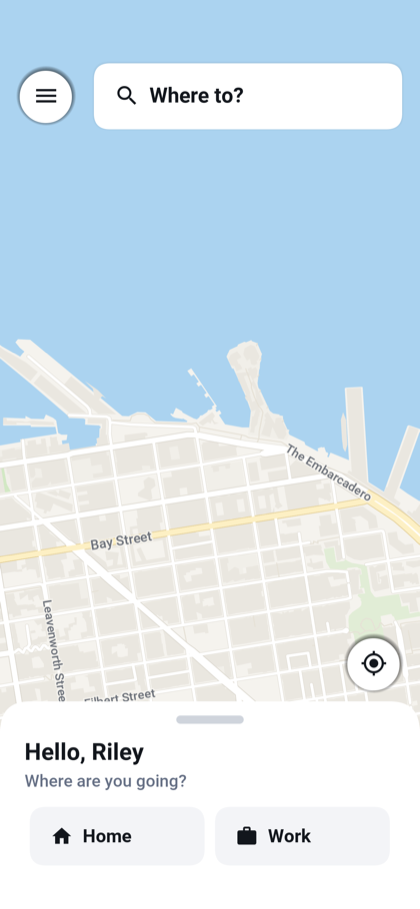
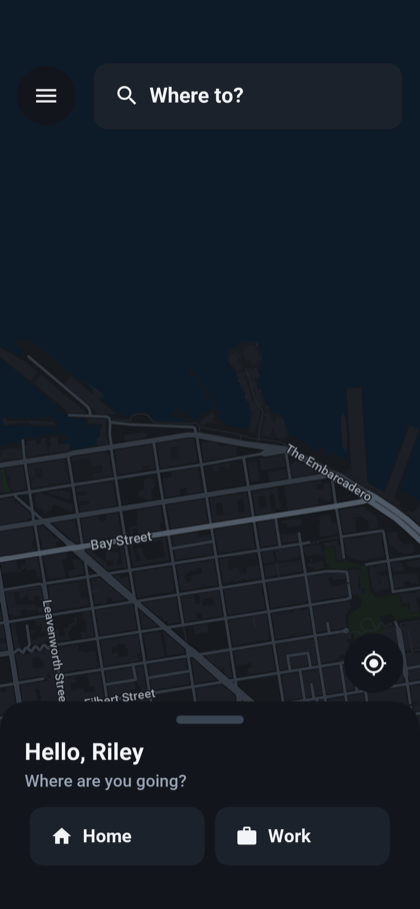
Wayline gives us concrete screens to inspect. Its primary buttons share a style, and the rider map switches colors with the theme:
Wayline rider map in the light theme.
The same rider screen in the dark theme.
*These are maintained Wayline guide screenshots, not a before-and-after comparison of compiler output.*
The new compiler is in [PR #5965](https://github.com/codenameone/CodenameOne/pull/5965). Try the headless CSS goal on your CI image, then inspect the screens your users actually use. The build setup should get smaller while the app keeps the appearance you chose.
## Discussion
*Which part of your build still needs a desktop environment when it shouldn't?*
 The same rider screen in the dark theme.
*These are maintained Wayline guide screenshots, not a before-and-after comparison of compiler output.*
The new compiler is in [PR #5965](https://github.com/codenameone/CodenameOne/pull/5965). Try the headless CSS goal on your CI image, then inspect the screens your users actually use. The build setup should get smaller while the app keeps the appearance you chose.
## Discussion
*Which part of your build still needs a desktop environment when it shouldn't?*
The same rider screen in the dark theme.
*These are maintained Wayline guide screenshots, not a before-and-after comparison of compiler output.*
The new compiler is in [PR #5965](https://github.com/codenameone/CodenameOne/pull/5965). Try the headless CSS goal on your CI image, then inspect the screens your users actually use. The build setup should get smaller while the app keeps the appearance you chose.
## Discussion
*Which part of your build still needs a desktop environment when it shouldn't?*