A Million Rows and Live Excel Formulas, Inside Your Own App
DataGrid scrolls a million rows with frozen columns, grouping, aggregates, editing and a tree mode. On top of it, Workbook reads and writes XLSX, ODS and CSV, and evaluates 402 Excel functions live, with completion and syntax highlighting while you…

My high school finishing exams included a test in Lotus 1-2-3. I've spent a good part of my career since then yelling at spreadsheets, and I still use them every day: the company P&L, grocery lists, student attendance. People love to hate them. The world runs on them anyway, because nothing else lets a person who isn't a programmer build a working model of their business in an afternoon.
Lotus is worth remembering for another reason. It didn't invent the spreadsheet. VisiCalc did. Lotus put charts next to the numbers, and mixing two good ideas made one of the first great software companies. Here are the components. Remix them.
This week Codename One gained two of them. DataGrid is a grid for data at enterprise scale, and Workbook turns it into a spreadsheet with real files and live formulas.
DataGrid is Table for a million rows
Table stays. It lays out a real component in every cell, which is what you want for a form with twenty fields. DataGrid is a different animal, closer to SwingX's JXTable and JXTreeTable if you remember those. It paints its own cells, like our Gantt chart and scheduler, so there's no component per row and only the visible rows cost anything.
If you've built a back office system you know why that matters. A parts catalog, a ledger, a log of sensor readings or a CRM export isn't a hundred rows. It's a hundred thousand on a slow day.
DataGrid grid = new DataGrid(model);   // any TableModel, a million rows is fine
grid.setFrozenColumns(1);
grid.getColumn(AMOUNT).setAggregate(GridAggregate.SUM);
grid.getColumn(ORDER).setAggregate(GridAggregate.COUNT);
grid.setGroupColumn(grid.getColumn(REGION));
The developer guide's example hands the grid a model whose getRowCount() returns 1,000,000 and scrolls past row 500,001. Selection is stored as ranges, so selecting all million rows is one range, not a million objects. Sorting and filtering reorder an array of row numbers and never copy your data.
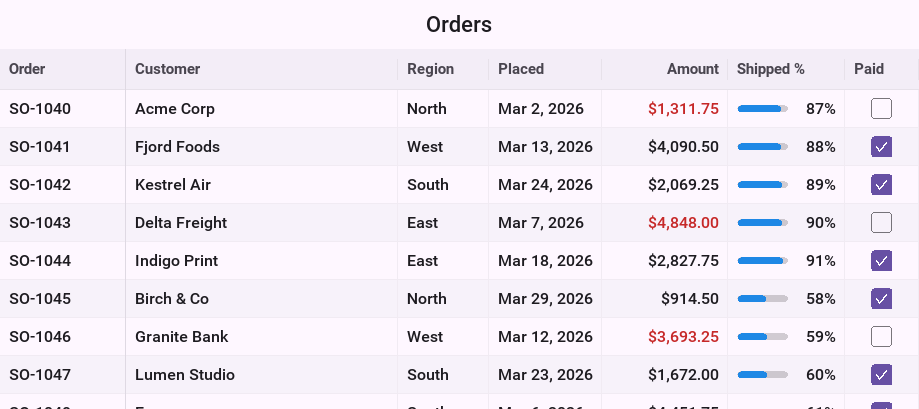
Frozen columns and custom renderers.
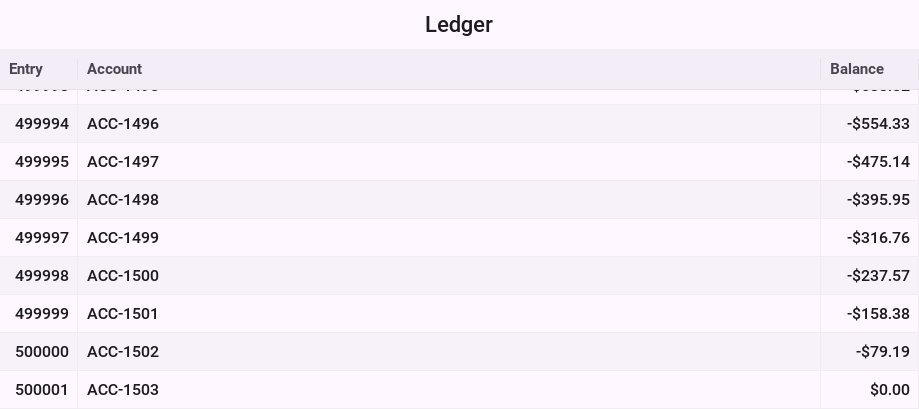
A million rows.
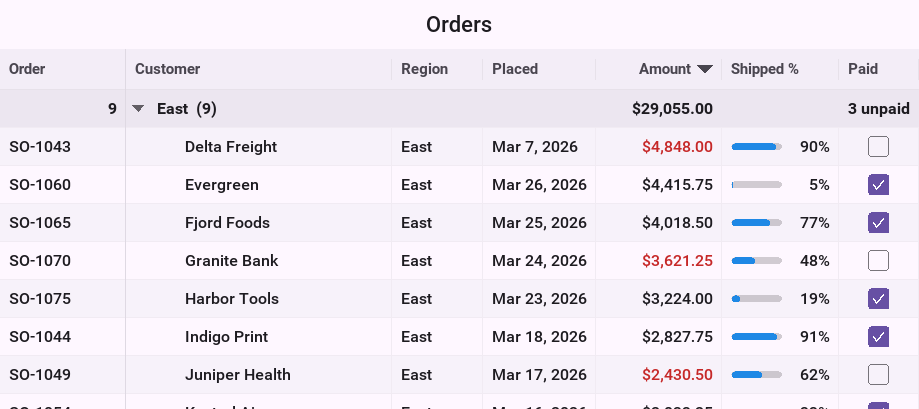
Grouping with aggregates.
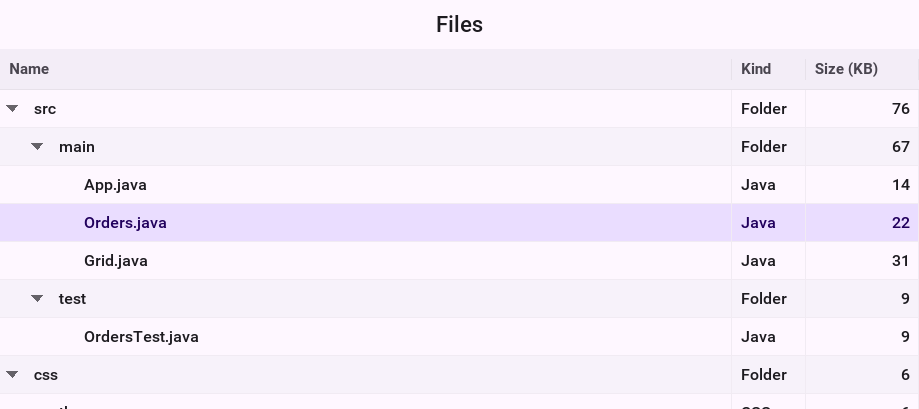
The tree grid.
The rest is the feature list of a grid you'd normally license: resizable, movable and hidden columns, flex widths, a stable multi-key sort, filters, keyboard navigation, single and multiple row selection, and in-place editing with date, boolean and choice pickers. Every column takes its own renderer, formatter and comparator, and the whole thing is styled with CSS, with light and dark modes and a native iOS look out of the box.
The tree mode takes a TreeTableModel and loads children lazily, so a node costs only what it shows when it opens. A bill of materials ten levels deep is fine.
Swing developers get a bonus. Our Swing compatibility layer's JTable and JXTreeTable now run on the same row engine, so the Swing code you bring to a phone sorts a big table as fast as the native grid does.
Then it becomes a spreadsheet
Workbook reads and writes .xlsx, .ods and CSV. Each Sheet is a TableModel, so it drops straight into a DataGrid, with the number formats from the file turned into column formatters:
Workbook book = Workbook.read(in, Workbook.Format.detect(fileName, header));
Sheet sheet = book.getSheet(0);
DataGrid grid = new DataGrid(sheet);
grid.setColumns(sheet.createColumns());
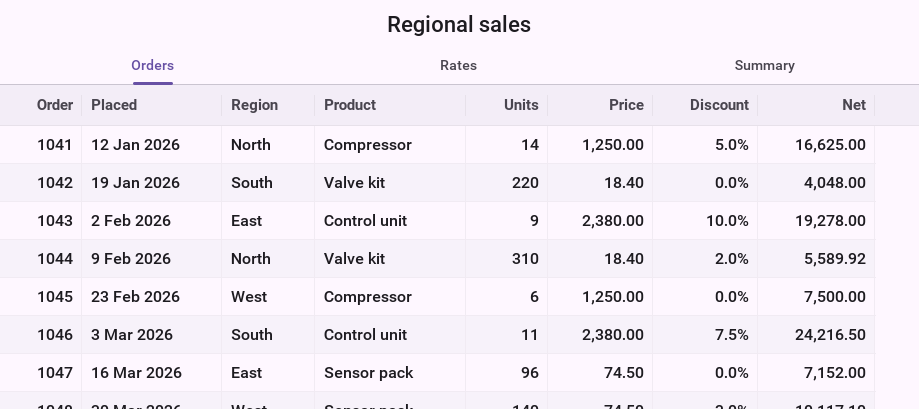
An orders sheet, live.
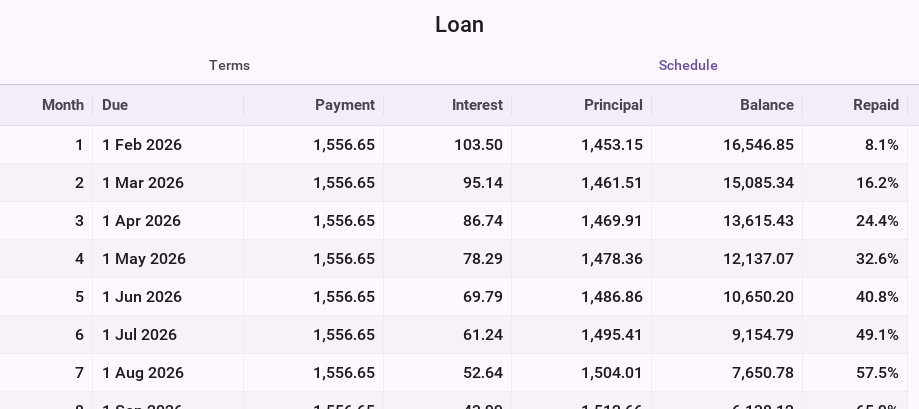
A loan model with PMT.
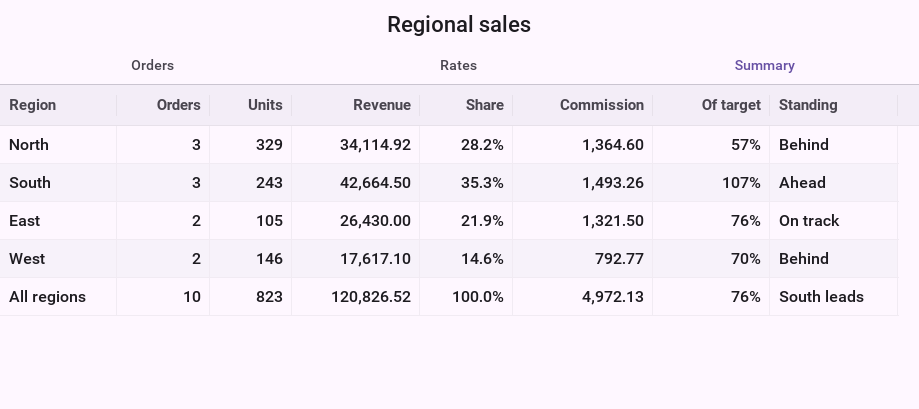
Cross-sheet references.
Formulas are live. Change a cell and every dependent cell recalculates, including on other sheets, and the grid repaints without a line of your code:
Workbook book = new Workbook();
Sheet sheet = book.addSheet("Orders");
sheet.addRow("Item", "Units", "Price", "Total");
sheet.addRow("Bolt", 40.0, 0.25);
sheet.addRow("Bracket", 12.0, 3.5);
sheet.setCellFormula("D2", "=B2*C2");
sheet.setCellFormula("D3", "=B3*C3");
sheet.setCellFormula("D4", "=SUM(D2:D3)");
Object total = sheet.getCellValue("D4");   // 52.0
sheet.setCellValue("B2", 100.0);            // D2 and D4 update
The engine implements 402 Excel functions across math, statistics, text, dates, lookup, financial, engineering, database and dynamic arrays. XLOOKUP, FILTER, SORT, SEQUENCE, LET and PMT are all there, with cross-sheet references, defined names and Excel's own nesting limit of 64.

Typing a formula feels like Excel
This is the part I'm proudest of, because it's what makes a spreadsheet usable by the people who actually live in them. The formula editor is a one line code editor. It colors each reference and outlines the same cells in the grid in the same color. It completes function names with a description, shows the argument list with the current argument in bold, inserts a cell's address when you tap it, and cycles $A$1 and the other reference forms on F4.
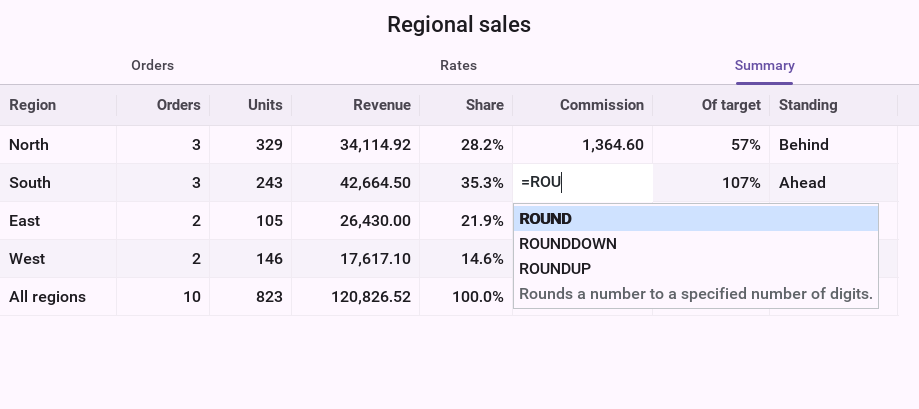
Function completion.
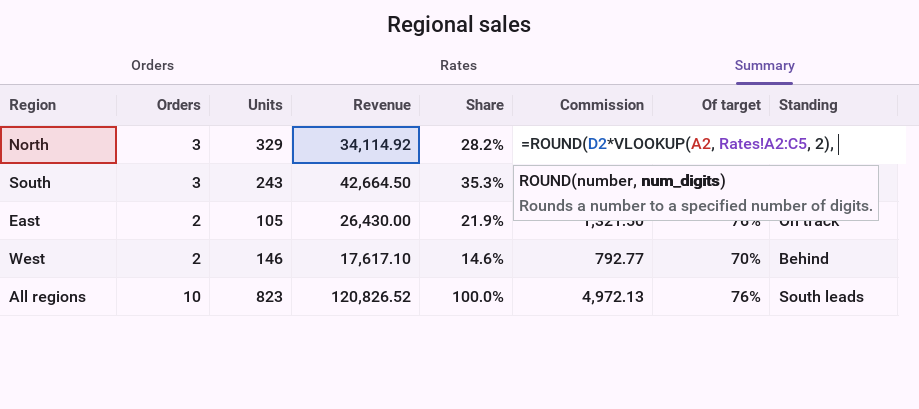
Argument hints and colored references.
FormulaBar is the ready-made field above the sheet, if you want the Excel layout without building it.
When the user is done, Workbook.fromGrid saves exactly what the grid shows: the sort, the filter, the groups as outline levels and the frozen columns. They open it in Excel and it looks the way they left it.
What you can build with this
Every company has a folder of spreadsheets that are secretly applications. A pricing model in sales, a shift roster in operations, an inventory count somebody reconciles every Friday. Today those files get emailed around, and the version on someone's laptop is the one that matters.
Pull them into your app instead. Import the sheet, keep the formulas the finance team wrote, and connect the cells to everything else Codename One does: your backend's database, a multi-tenant server, push notifications when a number crosses a line, a PDF of the result, a chart, a map. The model stays a spreadsheet the business can read. Everything around it is the part a spreadsheet could never do.
That's the Lotus move. Two ideas everyone already has, put together, make something nobody had.
Tomorrow: the backend that keeps each customer's data its own.
About the author
Entrepreneur, author, blogger, open source hacker, speaker, Java rockstar, developer advocate and more. ex-Sun/Oracle guy with 30 years of professional development experience. Shai built virtual machines, development tools, mobile phone environments, banking systems, startup/enterprise backends, user interfaces, development frameworks and much more. Shai is an award winning highly rated speaker with a knack for engaging the audience and deep technical chops.
Comments
Join the discussionNo comments yet. Be the first to comment.